
Update
FinOpsHubs.com is open: Put your FinOps hub to work
All posts
In July we said FinOpsHubs.com was coming. Today it’s open, and it’s free.
Sign in with the Microsoft account you already use for Azure, connect the FinOps hub you already run, and start getting answers in seconds. No Power BI license to buy. No reports to deploy. No data to copy anywhere.
You did the hard part when you deployed a hub: your cost data is clean, FOCUS-aligned, and sitting in Azure Data Explorer or Microsoft Fabric. FinOpsHubs.com is how the rest of your organization gets to use it.
Stop building reports, start finding answers
Most teams that run FinOps hubs hit the same wall. The standard reports cover the common questions, and every question after that becomes an ad-hoc query, a new Power BI page, or a request in someone’s queue. FinOpsHubs.com puts the answers one click away instead.
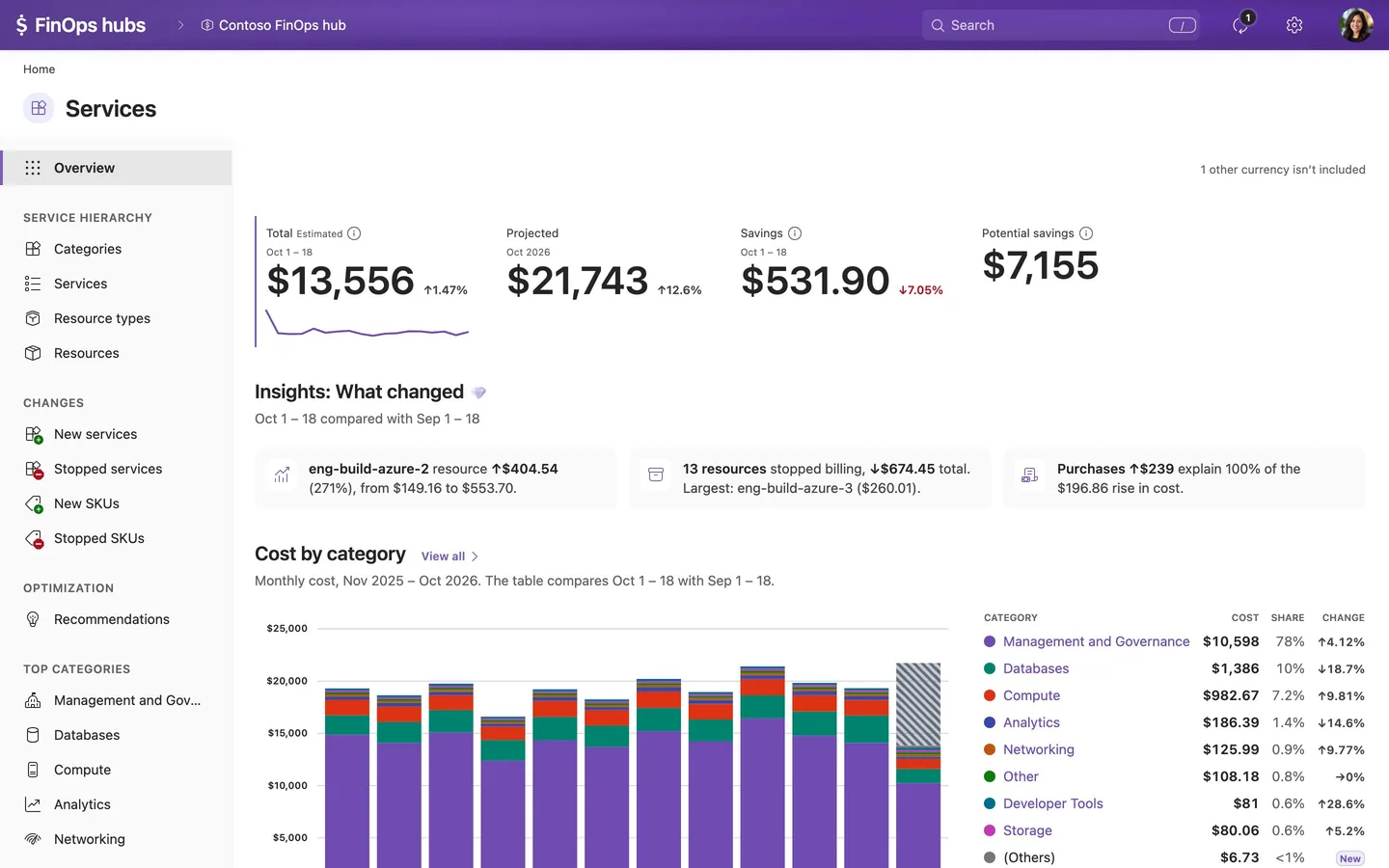
Follow every dollar. Start from a cost summary for your fiscal period, then go wherever the number takes you. Browse spend by cloud provider, billing account, and subaccount. See what drives cost by service, from category to service to the individual resource, with its tags. Or open Workloads to see what runs by subaccount, resource group, and resource, and what each costs. Expand any row to see what it holds.
See what changed, without hunting for it. Insights call out what moved since the last period: new spend, resources that stopped, the services, SKUs, and resources behind the biggest changes, and commitments that went unused.
Context moves with you. Pick a scope, period, and currency once. Every page follows, so the number on one page matches the number on the next.
Every view has a story. Start from built-in analyses, or customize any view: change the chart, the grouping, and the columns, then save it as your own. Share an analysis with a link. Download the table as CSV. And when you want to go further, see the exact KQL behind every view and take it with you.
Straight to the source
Every view queries your hub live. There are no extracts to schedule and no refresh to wait on: when new data lands in your hub, it’s in FinOpsHubs.com.
Your data, your cloud, not ours
Your browser queries your hub directly, as you. Cost data never passes through Allyte and is never stored by us. FinOpsHubs.com acts only as the signed-in person, so it can only show what that person can already see, and approving it grants no new access.
It works whether your hub is on a public endpoint or behind private networking. If your organization requires an admin to approve new apps, it’s a one-time step: FinOpsHubs.com tells you exactly what it asks for and gives you the link to send your admin.
New to FinOps hubs?
A FinOps hub brings your cloud cost data together in your own Azure environment. Deploy one in minutes with the FinOps toolkit, then come back and connect it. FinOpsHubs.com connects to hubs in Azure today.
Built by the people who build the toolkit
FinOpsHubs.com is an Allyte product, built by maintainers of the Microsoft FinOps toolkit. We built it because organizations need more than cloud and SaaS providers offer, and we want to give them something truly open, scalable, and extensible that they can take where they need without building from scratch. Cost insights are just the start, and there’s more to come. It’s early, and we’re shipping fast. Tell us what you want to see next.
Your hub is ready. Sign in and see what you’ve been missing.
Related
Want more out of your hub?
FinOpsHubs.com is the fastest way to see what your hub knows. When you're ready to extend it, defend a number, or build the practice around it, talk to the people who build it.