
Guide
Pay only for the hours your FinOps hub is active on Fabric
All posts
A FinOps hub needs a database it can query quickly. If that database runs on Microsoft Fabric, you’ve paid for Fabric compute around the clock so far, including the hours when the hub has nothing to do. Fabric’s new F0 capacity, in preview, changes that: You pay only while the hub is active. Whether that’s cheaper depends on how many hours a day that is.
What a FinOps hub is, and where Fabric comes in
A FinOps hub is the cost data platform of the Microsoft FinOps toolkit, an open-source project we co-maintain. You deploy it in your own Azure environment. Every day, Microsoft Cost Management exports your cost data in FOCUS, the FinOps Open Cost and Usage Specification, into the hub’s storage. Azure Data Factory then loads it into a database. FinOpsHubs.com, Power BI reports, and dashboards query that database. FinOpsHubs.com is our own product: Connect your hub, on Data Explorer or Fabric, and get answers about your cost in the browser, with no reports to build.
The database is either Azure Data Explorer or an eventhouse in Microsoft Fabric. In the toolkit documentation, we estimate $120 a month for the Data Explorer option and $300 a month for Fabric, based on an F2 capacity. A Fabric capacity is compute you rent by the hour, measured in capacity units (CUs), and you pay for it whether the hub uses it or not. F2 is the smallest paid size and already on the low end for a hub, so if yours runs on a larger capacity, the fixed cost is higher.
What changes with F0 and hybrid capacities
At FabCon in Barcelona, Microsoft announced on-demand billing across Fabric. Both new options are in preview. We haven’t covered them in the FinOps toolkit documentation yet and opened an issue to add them:
- F0 (“Fabric zero-provisioned”) has no rented compute and no fixed cost. Each workload pays only for the time it runs.
- A hybrid capacity is a regular capacity where you move single workloads, such as the hub’s eventhouse, to pay-per-use.
Pay-per-use costs more per unit. For the eventhouse, an hour of compute on demand costs 1.36 times what the same hour costs on a capacity you rent at pay-as-you-go prices. An eventhouse with nothing to do suspends itself, so on F0 the idle hours cost no compute. The question for a hub becomes: How many hours a day is it active?
A small FinOps team
Take a typical setup. Cost Management exports land overnight, and the hub ingests them in the early morning. During the day, a FinOps team of three or four people opens the dashboards once or twice each. The toolkit’s Power BI reports use DirectQuery, which means they query the hub live instead of keeping their own copy, so there is no scheduled refresh in between. The eventhouse is active only when someone looks.
Say ingestion keeps the eventhouse active for an hour a night, and the team’s sessions add up to about 2 more hours a day. That’s 3 active hours a day. Assume the eventhouse runs on 4 vCores while it’s active, the size Microsoft uses in its own example. Each vCore bills as one CU, so that’s 4 CUs × 3 hours × 30 days, about 360 CU-hours a month. These are assumptions to show the shape, not measurements: How long the eventhouse stays awake after the last query isn’t documented, and autoscale may run yours larger.
Here is how that compares with an F2. The math is ours, not Microsoft’s:
- F2 at pay-as-you-go: 2 CUs × 730 hours = 1,460 CU-hours a month, used or not.
- F2 reserved: The reservation discount is usually about 41%, for a 1-year or a 3-year term. That’s the cost of about 860 pay-as-you-go CU-hours.
- F0: 360 CU-hours × 1.36 = the cost of about 490 pay-as-you-go CU-hours.
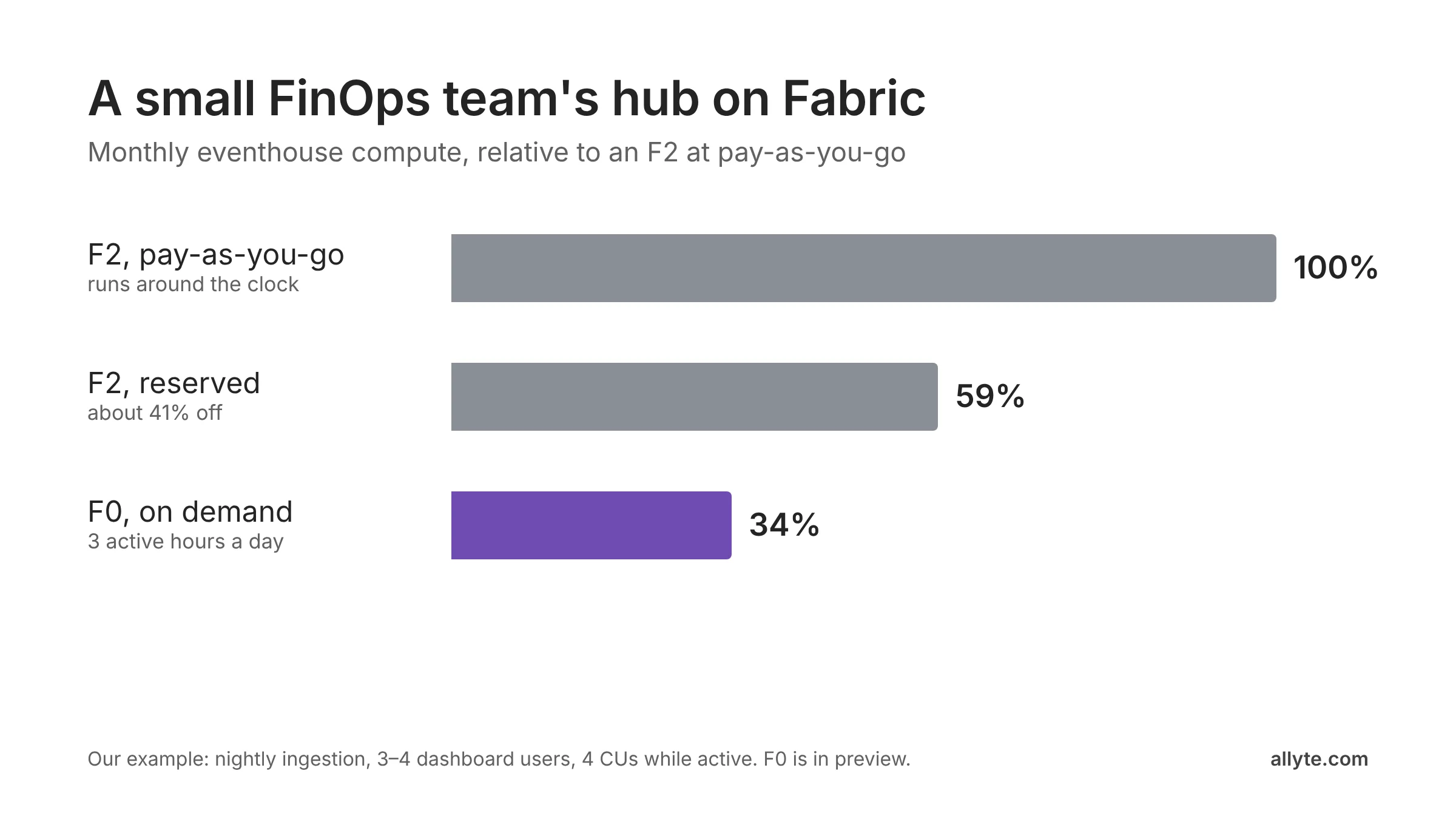
In this example, F0 costs about a third of a pay-as-you-go F2 and a little over half of a reserved one. It can be faster too: On-demand operations run outside the capacity’s CU limit, so the eventhouse isn’t held to the F2’s 2 CUs or throttled when the whole team opens the dashboards at once. The break-even sits at about 1,070 eventhouse CU-hours a month against pay-as-you-go (1,460 / 1.36) and about 630 against a reservation (860 / 1.36). Your own numbers come from the Capacity Metrics app, not from this example.
How F0 bills the eventhouse
On F0, the hub’s eventhouse bills through its own Azure meter, Eventhouse OD On-Demand Usage CU. Two operations count against it, EventHouse UpTime and KustoUpTime (Kusto is the engine behind both eventhouses and Data Explorer), and both measure how long the eventhouse is active. The price is the pay-as-you-go rate per CU-hour times a multiplier. The pay-as-you-go rate per CU-hour is half the hourly price of an F2, and the multiplier for Real-Time Intelligence - Eventhouse is 1.36. If you pull prices from the Azure Retail Prices API, the multiplier is already included, so don’t apply it twice. Microsoft notes that prices and multipliers are subject to change.
UpTime counts active seconds times vCores. In Microsoft’s example, 4 vCores for 30 seconds is 120 CU-seconds. Autoscale decides how many vCores the eventhouse uses. Waking a suspended eventhouse takes a few seconds, so expect the first query after a quiet period to be a little slower.
On a regular capacity, Fabric spreads usage over time, which it calls smoothing. On-demand usage isn’t smoothed: Each operation counts in full when it runs.
When F0 costs more
The most expensive case is a fixed minimum. The toolkit’s workaround for InternalServiceError sets the eventhouse minimum consumption to Medium (18 CUs) and reruns the ETL. With a minimum in place, UpTime never drops below it. 18 CUs around the clock is 18 × 730 = 13,140 CU-hours a month. That’s nine times what an entire F2 provides, and at 1.36 times the rate, roughly 12 times the cost of an F2 at pay-as-you-go. If you applied the workaround at some point, check the setting before you switch and reset it.
A busy hub can lose too. If a larger team queries it through the day, or other tools keep the eventhouse awake, it can pass the break-even and cost more than the F2 did.
Hybrid capacity when you already pay for a larger one
If the hub’s workspace already sits on a bigger capacity, say an F64 for Power BI, F0 isn’t the only option. On F2 and up, you can turn on on-demand billing for single categories, and Microsoft then calls it a hybrid capacity. Operations in an on-demand category don’t draw CUs from the shared capacity, run outside its CU limit, and can’t throttle the capacity as a whole.
With the Eventhouse category on, the hub stops competing with your reports for CUs. It bills at 1.36 times pay-as-you-go, instead of running inside capacity you already pay for. That pays off only if the capacity would otherwise throttle or need a larger size. Microsoft’s own guidance points the same way: A stable baseline with variable load is the case for a paid capacity plus on-demand.
Guardrails during the preview
Spend limits are not a hard cap. You set a spend limit per category in CU-hours over a rolling 24-hour window, and Fabric checks it every 5 minutes. Jobs that are already running finish and get billed. The default is the category’s full quota, so set your own in the Fabric admin portal right after you create the capacity. An approved quota increase doesn’t change the spend limit.
Your region may have no quota at all. On-demand quota applies per category, subscription, and region, and regional availability can set it to 0 CU-hours. A quota request can take up to 24 hours, and approval isn’t guaranteed. The hub has to be in the same region as its Fabric capacity, so check quota in that region first. By default, a subscription can have 20 F0 and hybrid capacities per region.
F0 has fewer options. Workspace monitoring isn’t supported on F0, and on-demand billing can’t be switched off there. Trial capacities can’t use on-demand billing at all. Moving from F0 to a paid size later needs regular capacity quota, because on-demand quota doesn’t count toward it. That move turns on-demand off for every category, and moving back to F0 turns them all on again.
Pausing an F0 capacity has little to save, since there’s no fixed charge. A paused capacity also pauses its on-demand categories. That leaves the eventhouse unable to take new cost data until you resume it. Storage is billed separately either way.
All of this is in preview, and prices, multipliers, and behavior can still change.
How to measure
The Capacity Metrics app has an On-demand compute tab. It shows CU-hours per category, usage against your spend limit, a 14-day trend, and a breakdown by item and operation. Two weeks of that data tell you more about your hub than the estimates in this post. The Monitor hub doesn’t show on-demand usage, and the capacity overview events leave it out too. Microsoft added a separate event for that, Microsoft.Fabric.Capacity.OnDemandSummary, and says it isn’t meant for reconciling invoices.
The Azure invoice lists capacity, on-demand, and storage separately. The on-demand meter should also arrive as its own rows in the Microsoft Cost Management FOCUS export. Those rows flow into your FinOps hub like any other cost, so the hub can show what running it costs. Look for the meter name Eventhouse OD On-Demand Usage CU. FinOpsHubs.com connects to hubs on a Fabric eventhouse as well as on Azure Data Explorer. Connect yours, and the same rows show up there next to the rest of your cost, with the KQL behind every view if you want to build your own check.
6 checks before you move your hub to F0
- Measure what the eventhouse consumes today in the Capacity Metrics app, and compare it with about 1,070 CU-hours a month for a pay-as-you-go F2, or about 630 for a reserved one.
- Check the eventhouse minimum consumption, and reset it if it’s still set from troubleshooting.
- Confirm on-demand quota for Real-Time Intelligence - Eventhouse in the hub’s region.
- Set a spend limit in the Fabric admin portal, knowing that running jobs still finish and bill.
- Plan to monitor through the Capacity Metrics app, since workspace monitoring isn’t available on F0.
- If the hub shares a larger capacity, compare hybrid billing with the throttling or upsizing it would avoid.
If you’ve already moved a hub to F0, I’d like to know what your On-demand compute tab shows after two weeks. If you’d like a second pair of eyes on your numbers before you switch, talk to us.
Related
Running your FinOps hub on Fabric?
We help build and govern the FinOps toolkit. If you're weighing F0 or hybrid billing for your hub, talk to us and we'll go through your numbers with you.